
General
Specification / Documentation
Firmware Update
http://www.downloads.netgear.com/files/GDC/MR1100-100EUS/MR1100-100EUS_23113509_NTG9x50C_12.06.03.00_00_Generic_05.01.secc.spk
(https://community.netgear.com/t5/Mobile-Routers-Hotspots-Modems/MR1100-100EUS-2018-end-of-the-year-expectations/m-p/1618596)
Community
Login
ulrich.horn@familie-horn.de : Wissen2019 : UHDD
Articles / Questions
Band locking
https://www.lteforum.at/mobilfunk/das-erste-1gbit-lte-netgear-mr1100-nighthawk-m1.6908/seite-3.html
Band-Locking geht auch ohne Passwort.
Telnet geht nur über USB-Tethering.
Standard-Werte:
IP: 192.168.1.1
Port: 5510
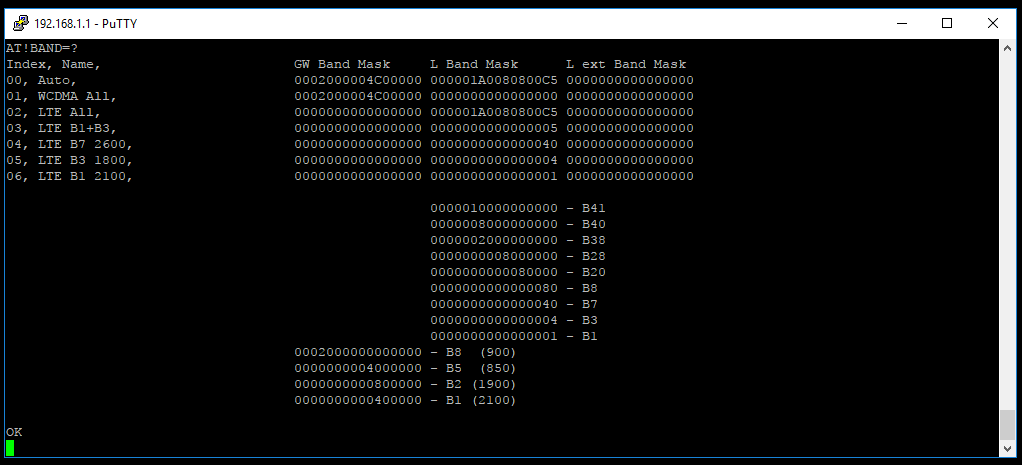
Band-locking geht mittels AT-Command:
AT!BAND=XX,"NAME",Y,Z
XX = Nummerierung in HEX Format
Y = Maske für UMTS
Z = Maske für LTE
Alle Masken kann man über AT!BAND=? abrufen
Bei B1 ist die Maske 0000000000000001
B3 ist 0000000000000004
Also die Kombination aus B1+B3 ist Maske 0000000000000005.
Bei der Eingabe können die "überschüssigen" Nullen weggelassen werden.
Ein BSP B1+B3 wäre:
AT!BAND=03,"LTE B1+B3",0,5
https://forum.sierrawireless.com/t/mc77xx-how-to-create-custom-bands/6144
1. Obtaining Band Masks
The following procedure can be used to obtain available band basks:
AT!ENTERCND=“OEM password”
AT!BAND=?
This will display the existing selections and the band masks for the bands the device supports.
Using MC7710, for example:
00, All bands, 0002000000600380 00000000000800C5
01, Europe 3G, 0002000000400000 0000000000000000
03, Europe 2G, 0000000000000380 0000000000000000
04, North America 2G, 0000000000200000 0000000000000000
05, GSM ALL, 0000000000200380 0000000000000000
06, Europe, 0002000000400380 00000000000800C5
07, North America, 0000000000200000 0000000000000040
08, WCDMA ALL, 0002000000400000 0000000000000000
09, LTE ALL, 0000000000000000 00000000000800C5
                                                 			     0000000000080000 - B20
                                                 			     0000000000000080 - B8
                                                			     0000000000000040 - B7
                                                 			     0000000000000004 - B3
                                                 			     0000000000000001 - B1
                                		0002000000000000 - B8  (900)
                                		0000000000400000 - B1 (2100)
                                		0000000000200000 -     G1900
                                		0000000000000200 -     G900P
                                		0000000000000100 -     G900E
                                		0000000000000080 -     G1800
Blue = LTE bands
Green = GSM/WCDMA bands
- Creating a new Band Selection
To create a new band selection, you can combine band masks using a bitwise OR to choose multiple bands.
AT!BAND=,<”name”>,GSM/WCDMA band mask, LTE band mask.
Examples:
1.To create LTE B3 selection execute
AT!BAND=10,”LTE B3”,0,4
2.To create LTE B1/B3/B7 Selection
AT!BAND=10, “LTE B1/B3/B7”,0,45
- Deleting Newly Created Band Selection
To delete newly created band selection, execute AT!BAND=10,””,0,0
- Reverting Back to Default Band Selection
To revert back to default band selections, execute AT!BANDDEF
https://ltehacks.com/viewtopic.php?t=33